Back to Projects
NUX: Learning Between the Lines
NUX is a mobile streaming platform built around a simple insight: people don't lack the desire to learn, they lack the time and mental bandwidth to commit to it.
Instead of organizing content by format or genre, NUX groups everything by narrative theme, letting users pick up meaningful, bite-sized learning in the small windows of their day, a commute, a coffee break, a few minutes before bed.
The goal was to remove the guilt of "just watching for fun" and the friction of "committing to something long," so growth feels as easy and low-stakes as scrolling.
NUX: Learning Between the Lines
Persona
Customer journey mapping
Kano survey design
Interview guide design
Sampling & recruitment strategy
NUX is a mobile learning platform built on a simple insight: people don't lack the desire to learn, they lack the time and mental bandwidth to commit to it. Maybe that's why we default to easy, disposable media over content that actually sticks with us.
The app was designed around one persona: a busy, full-time working mom who loves learning and meaningful conversation, but only has a 45-minute commute home each day.
Instead of organizing by format, NUX organizes by theme. Pick a topic, and explore it through whatever mix of articles, documentaries, podcasts, videos, and short courses fits your time, mood, and attention span that day.
A commute. A coffee break. Ten minutes before bed. NUX turns those small pockets of time into real learning, without the guilt of "just watching for fun" or the pressure of committing to something long. The goal: make personal growth feel as effortless and low-stakes as scrolling.
👤 Role
Solo UX Designer & Researcher
🏢 Client
Fictional Case Study
🗓️ Timeline
6 Weeks (Nov–Dec 2025)
🧑💼 Role
Solo UX Designer & Researcher
🏢 Client
Fictional Case Study
⏳ Timeline
6 Weeks (Nov–Dec 2025)
The Challenge
Learning has never been more accessible, yet finding the time to do it has never been harder. People genuinely want to grow, but after a long day of work and responsibilities, committing to a course, documentary, or book can feel overwhelming. As a result, many turn to quick, entertaining content instead of meaningful learning, not because they lack motivation, but because existing platforms don't fit into their everyday lives.
The Challenge
Learning has never been more accessible, yet finding the time to do it has never been harder. People genuinely want to grow, but after a long day of work and responsibilities, committing to a course, documentary, or book can feel overwhelming. As a result, many turn to quick, entertaining content instead of meaningful learning, not because they lack motivation, but because existing platforms don't fit into their everyday lives.
01 Research: Understanding the User
To ground the design in a real person rather than an abstract user, I built a persona around the project's core challenge: balancing a strong desire to learn with limited time and mental bandwidth.
01 Research: Understanding the User
To ground the design in a real person rather than an abstract user, I built a persona around the project's core challenge: balancing a strong desire to learn with limited time and mental bandwidth.
01 Research: Understanding the User
To ground the design in a real person rather than an abstract user, I built a persona around the project's core challenge: balancing a strong desire to learn with limited time and mental bandwidth.
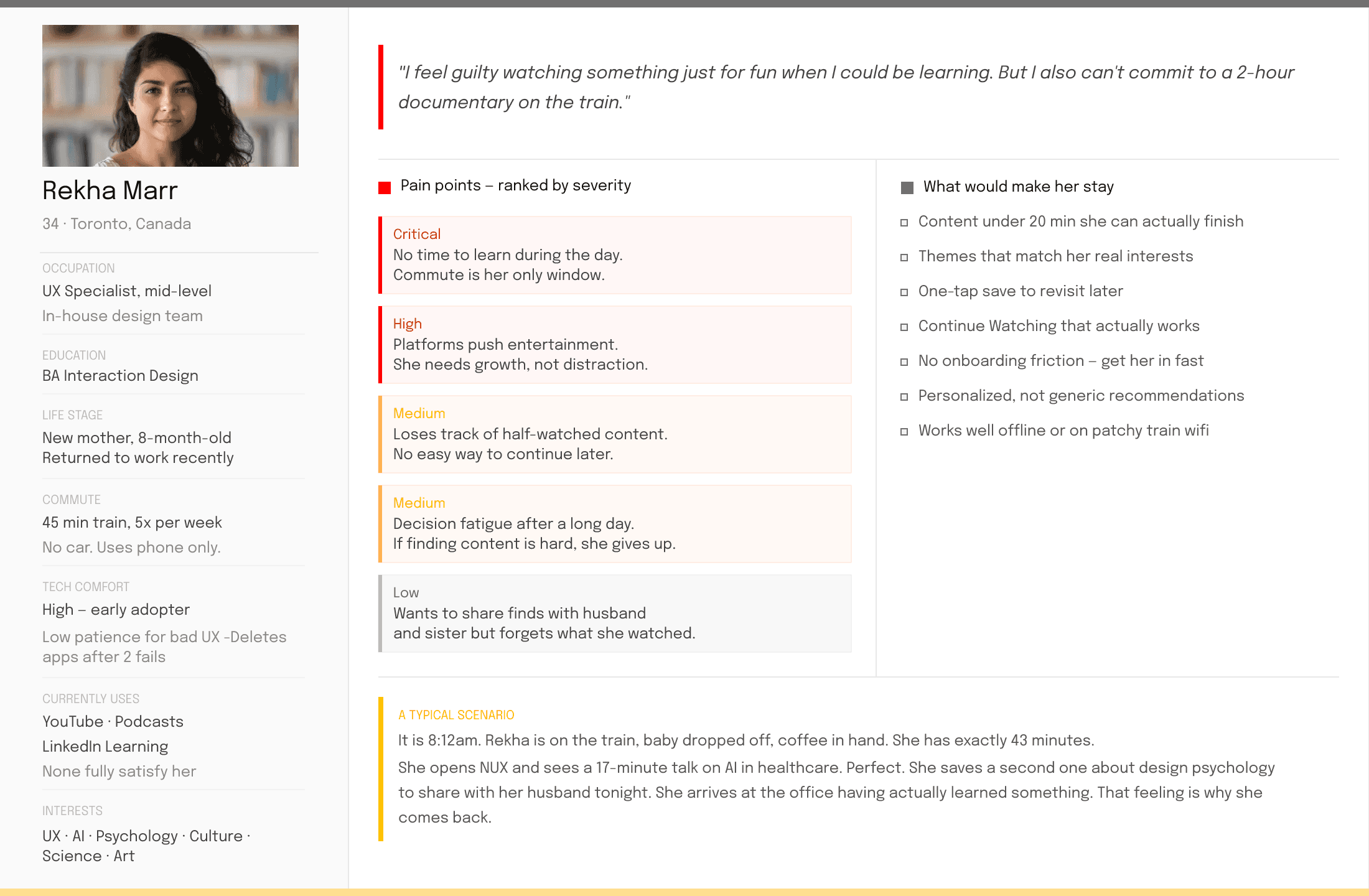
Persona: Rekha Marr is a 34-year-old UX Specialist and new mother whose only guaranteed personal time is a 45-minute train commute. She doesn't want to scroll aimlessly, but she also can't commit to long-form learning. She enjoys discovering new ideas and having thoughtful conversations about the topics that inspire her. Rather than searching for a podcast, an article, or a documentary, she wants to explore a subject she admires and dive into it through different formats, depending on her time, mood, and attention. This way, every small moment becomes another step in the same learning journey, not the start of something entirely new.
Persona: Rekha Marr is a 34-year-old UX Specialist and new mother whose only guaranteed personal time is a 45-minute train commute. She doesn't want to scroll aimlessly, but she also can't commit to long-form learning. She enjoys discovering new ideas and having thoughtful conversations about the topics that inspire her. Rather than searching for a podcast, an article, or a documentary, she wants to explore a subject she admires and dive into it through different formats, depending on her time, mood, and attention. This way, every small moment becomes another step in the same learning journey, not the start of something entirely new.
Research Method: Open Card Sort
Because NUX organizes content around themes rather than media types, the information architecture became one of the most critical design decisions. Before designing the interface, I needed to understand how people naturally categorized diverse content and whether they thought in terms of topics, formats, or something else.
To answer this, I conducted an open card sort in UXtweak with eight participants. They were asked to group 20 pieces of content, including books, documentaries, TV series, games, articles, and courses, into categories that made sense to them and label those groups in their own words.
Research Method: Open Card Sort
Because NUX organizes content around themes rather than media types, the information architecture became one of the most critical design decisions. Before designing the interface, I needed to understand how people naturally categorized diverse content and whether they thought in terms of topics, formats, or something else.
To answer this, I conducted an open card sort in UXtweak with eight participants. They were asked to group 20 pieces of content, including books, documentaries, TV series, games, articles, and courses, into categories that made sense to them and label those groups in their own words.

The results revealed a consistent pattern: participants rarely grouped content by its format. Instead, they organized it around shared themes, moods, and learning intentions. These insights became the foundation of NUX's information architecture, validating the decision to organize the platform by topics rather than by media type.
The results revealed a consistent pattern: participants rarely grouped content by its format. Instead, they organized it around shared themes, moods, and learning intentions. These insights became the foundation of NUX's information architecture, validating the decision to organize the platform by topics rather than by media type.

Three clear patterns emerged. Participants consistently organized content by topic it represented rather than by its media format.
Entertainment was grouped by mood, not format. 71% of participants placed Call of Duty and Squid Gametogether, despite one being a video game and the other a TV series.
Creative pursuits formed their own theme. 86% grouped Cooking, Street Photography, and Graphic Designtogether, viewing them as creative activities rather than separate lifestyle topics.
Knowledge-driven content clustered across formats. 43% grouped scientific and educational content together regardless of whether it was a book, documentary, or course, suggesting that users prioritized the desire to learn over the type of media.
Three clear patterns emerged. Participants consistently organized content by topic it represented rather than by its media format.
Entertainment was grouped by mood, not format. 71% of participants placed Call of Duty and Squid Gametogether, despite one being a video game and the other a TV series.
Creative pursuits formed their own theme. 86% grouped Cooking, Street Photography, and Graphic Designtogether, viewing them as creative activities rather than separate lifestyle topics.
Knowledge-driven content clustered across formats. 43% grouped scientific and educational content together regardless of whether it was a book, documentary, or course, suggesting that users prioritized the desire to learn over the type of media.

These insights informed the information architecture, resulting in six primary content categories: Science & Technology, Society & Culture, Creativity & Art, Entertainment, Mind & Life, and Historical Stories. Together, they formed the backbone of NUX's first site map.
These insights informed the information architecture, resulting in six primary content categories: Science & Technology, Society & Culture, Creativity & Art, Entertainment, Mind & Life, and Historical Stories. Together, they formed the backbone of NUX's first site map.
02 Define: Structuring the Information
With the six content categories established, I translated the findings into a clear information architecture. The first site map was organized around four primary navigation areas, Home, Topics, Library, and Account, creating a structure that made discovering, saving, and returning to content simple and intuitive.
02 Define: Structuring the Information
With the six content categories established, I translated the findings into a clear information architecture. The first site map was organized around four primary navigation areas, Home, Topics, Library, and Account, creating a structure that made discovering, saving, and returning to content simple and intuitive.
02 Define: Structuring the Information
With the six content categories established, I translated the findings into a clear information architecture. The first site map was organized around four primary navigation areas, Home, Topics, Library, and Account, creating a structure that made discovering, saving, and returning to content simple and intuitive.

Validation Method: Tree Testing
Three issues emerged immediately.
To validate the information architecture, I built a text-only version of the site structure in Lyssna and asked participants to complete realistic navigation tasks, such as finding specific topics or saved content. By analyzing their navigation paths, success rates, and points of confusion, I identified where the structure and labels needed improvement before moving into the final design.
1- Participants frequently confused Topics and Library. When asked to find a specific topic, 4 of 7 participants clicked Library, as both sections appeared to be places where content was stored rather than serving distinct purposes.
2- The navigation labels also created friction. Keep Watching, Your Daily Recommendation, and Because You Watchedrepeatedly led users down the wrong path, not because they didn't know what they were looking for, but because the labels didn't match their expectations.
3- Finally, content categorization didn't always align with users' mental models. For example, Amazon Rainforest was placed under Society & Culture, while most participants expected to find it under Science & Technology.
Validation Method: Tree Testing
Three issues emerged immediately.
To validate the information architecture, I built a text-only version of the site structure in Lyssna and asked participants to complete realistic navigation tasks, such as finding specific topics or saved content. By analyzing their navigation paths, success rates, and points of confusion, I identified where the structure and labels needed improvement before moving into the final design.
1- Participants frequently confused Topics and Library. When asked to find a specific topic, 4 of 7 participants clicked Library, as both sections appeared to be places where content was stored rather than serving distinct purposes.
2- The navigation labels also created friction. Keep Watching, Your Daily Recommendation, and Because You Watchedrepeatedly led users down the wrong path, not because they didn't know what they were looking for, but because the labels didn't match their expectations.
3- Finally, content categorization didn't always align with users' mental models. For example, Amazon Rainforest was placed under Society & Culture, while most participants expected to find it under Science & Technology.
Validation Method: Tree Testing
Three issues emerged immediately.
To validate the information architecture, I built a text-only version of the site structure in Lyssna and asked participants to complete realistic navigation tasks, such as finding specific topics or saved content. By analyzing their navigation paths, success rates, and points of confusion, I identified where the structure and labels needed improvement before moving into the final design.
1- Participants frequently confused Topics and Library. When asked to find a specific topic, 4 of 7 participants clicked Library, as both sections appeared to be places where content was stored rather than serving distinct purposes.
2- The navigation labels also created friction. Keep Watching, Your Daily Recommendation, and Because You Watchedrepeatedly led users down the wrong path, not because they didn't know what they were looking for, but because the labels didn't match their expectations.
3- Finally, content categorization didn't always align with users' mental models. For example, Amazon Rainforest was placed under Society & Culture, while most participants expected to find it under Science & Technology.

03 Design: Wireframes and Visual System
With the information architecture validated, I moved into Figma by first setting up the design environment. I created an iPhone 11 Pro frame (375 × 812 px), defined the layout grids, spacing system, and constraints to establish a consistent foundation before designing any screens.
From there, I designed the complete user journey, including the onboarding flow, personalized home, topic exploration, content details, and streaming experience.
Each screen used a grid tailored to its purpose.
An 8-column grid (16 px gutters) supported content-rich pages like Homeand Explore, making information easy to scan. The streaming page used a hierarchical grid to keep video playback as the primary focus while maintaining quick access to related content. For browsing, a 4×4 modular grid (24 px gutters) created a balanced layout that made comparing and discovering content effortless.
03 Design: Wireframes and Visual System
With the information architecture validated, I moved into Figma by first setting up the design environment. I created an iPhone 11 Pro frame (375 × 812 px), defined the layout grids, spacing system, and constraints to establish a consistent foundation before designing any screens.
From there, I designed the complete user journey, including the onboarding flow, personalized home, topic exploration, content details, and streaming experience.
Each screen used a grid tailored to its purpose.
An 8-column grid (16 px gutters) supported content-rich pages like Homeand Explore, making information easy to scan.
03 Design: Wireframes and Visual System
With the information architecture validated, I moved into Figma by first setting up the design environment. I created an iPhone 11 Pro frame (375 × 812 px), defined the layout grids, spacing system, and constraints to establish a consistent foundation before designing any screens.
From there, I designed the complete user journey, including the onboarding flow, personalized home, topic exploration, content details, and streaming experience.
Each screen used a grid tailored to its purpose.
An 8-column grid (16 px gutters) supported content-rich pages like Homeand Explore, making information easy to scan. The streaming page used a hierarchical grid to keep video playback as the primary focus while maintaining quick access to related content. For browsing, a 4×4 modular grid (24 px gutters) created a balanced layout that made comparing and discovering content effortless.
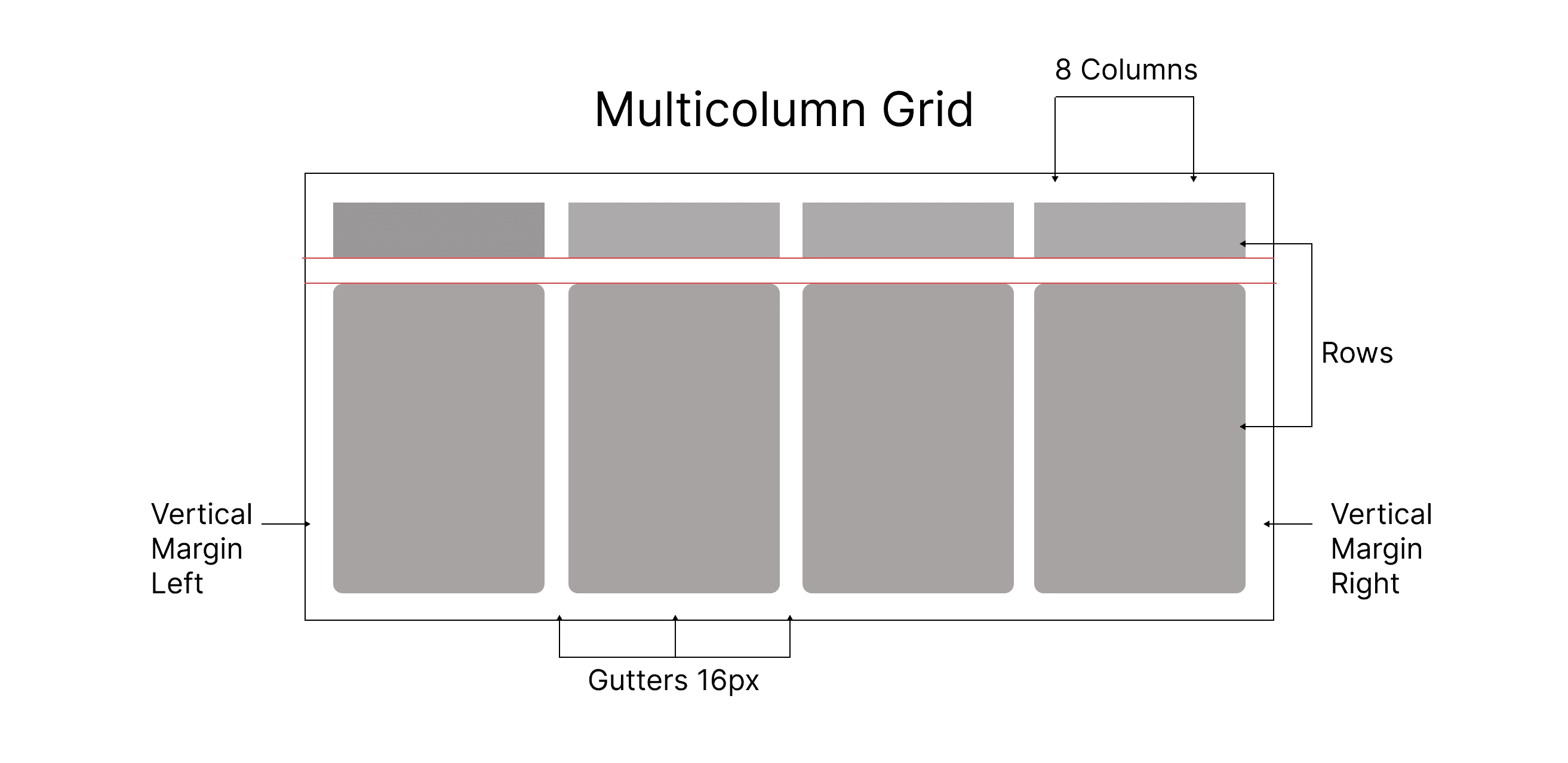
An 8-column grid (16 px gutters) supported content-rich pages like Home and Explore, making information easy to scan. The streaming page used a hierarchical grid to keep video playback as the primary focus while maintaining quick access to related content. For browsing, a 4×4 modular grid (24 px gutters) created a balanced layout that made comparing and discovering content effortless.
An 8-column grid (16 px gutters) supported content-rich pages like Home and Explore, making information easy to scan.

The streaming page used a hierarchical grid to keep video playback as the primary focus while maintaining quick access to related content.
The streaming page used a hierarchical grid to keep video playback as the primary focus while maintaining quick access to related content.
The streaming page used a hierarchical grid to keep video playback as the primary focus while maintaining quick access to related content.

For browsing, a 4×4 modular grid (24 px gutters) created a balanced layout that made comparing and discovering content effortless.
For browsing, a 4×4 modular grid (24 px gutters) created a balanced layout that made comparing and discovering content effortless.
For browsing, a 4×4 modular grid (24 px gutters) created a balanced layout that made comparing and discovering content effortless.

With the layout system in place, I began translating the information architecture into wireframes, focusing on the core user journey from onboarding to content discovery and streaming.
With the layout system in place, I began translating the information architecture into wireframes, focusing on the core user journey from onboarding to content discovery and streaming.


04 Test: Validating with Real Behavior
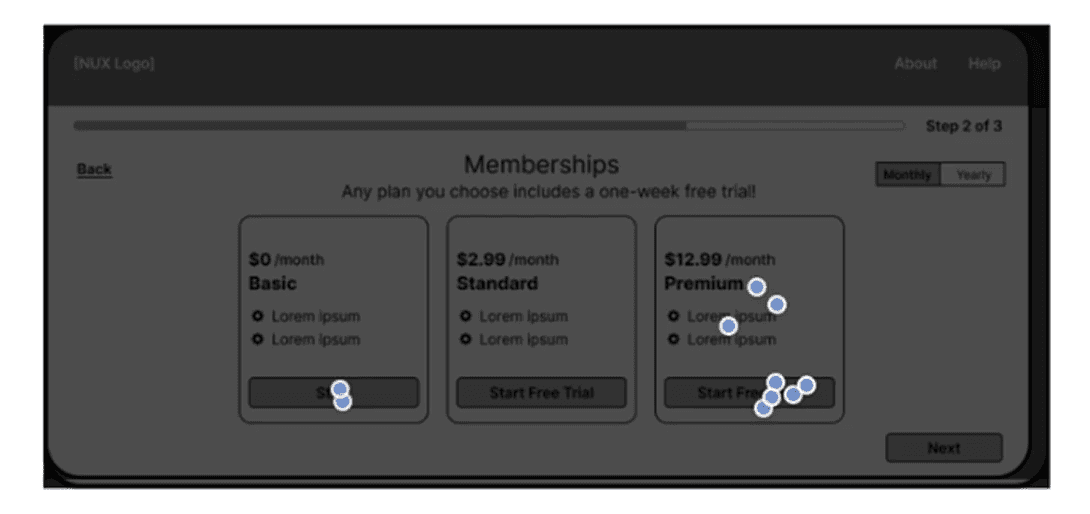
Testing method: click maps and heat maps. After the first round of prototyping, behavioral data surfaced three specific friction points.
04 Test: Validating with Real Behavior
Testing method: click maps and heat maps. After the first round of prototyping, behavioral data surfaced three specific friction points.
04 Test: Validating with Real Behavior
Testing method: click maps and heat maps. After the first round of prototyping, behavioral data surfaced three specific friction points.

On Create Profile, users clicked the logo or back button instead of the "Sign in" link, since it blended into the visual hierarchy. I increased contrast and weight on that text.
On Create Profile, users clicked the logo or back button instead of the "Sign in" link, since it blended into the visual hierarchy. I increased contrast and weight on that text.
On Create Profile, users clicked the logo or back button instead of the "Sign in" link, since it blended into the visual hierarchy. I increased contrast and weight on that text.

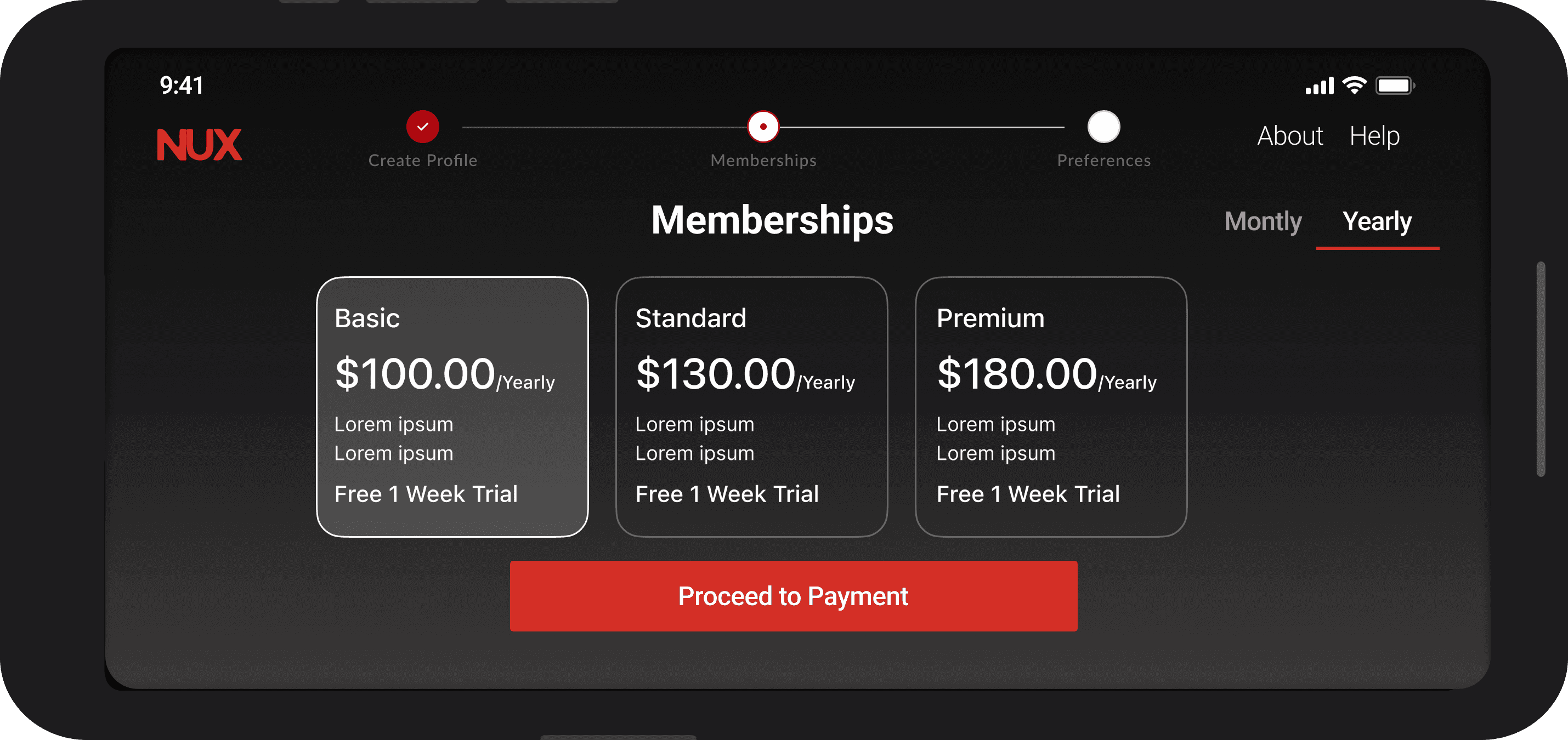
On Membership Selection, attention scattered between the plan cards and the Proceed to Payment button, since users were unsure which action confirmed their choice. I collapsed this to one unambiguous interaction: select the plan, then proceed.
On Membership Selection, attention scattered between the plan cards and the Proceed to Payment button, since users were unsure which action confirmed their choice. I collapsed this to one unambiguous interaction: select the plan, then proceed.
On Membership Selection, attention scattered between the plan cards and the Proceed to Payment button, since users were unsure which action confirmed their choice. I collapsed this to one unambiguous interaction: select the plan, then proceed.

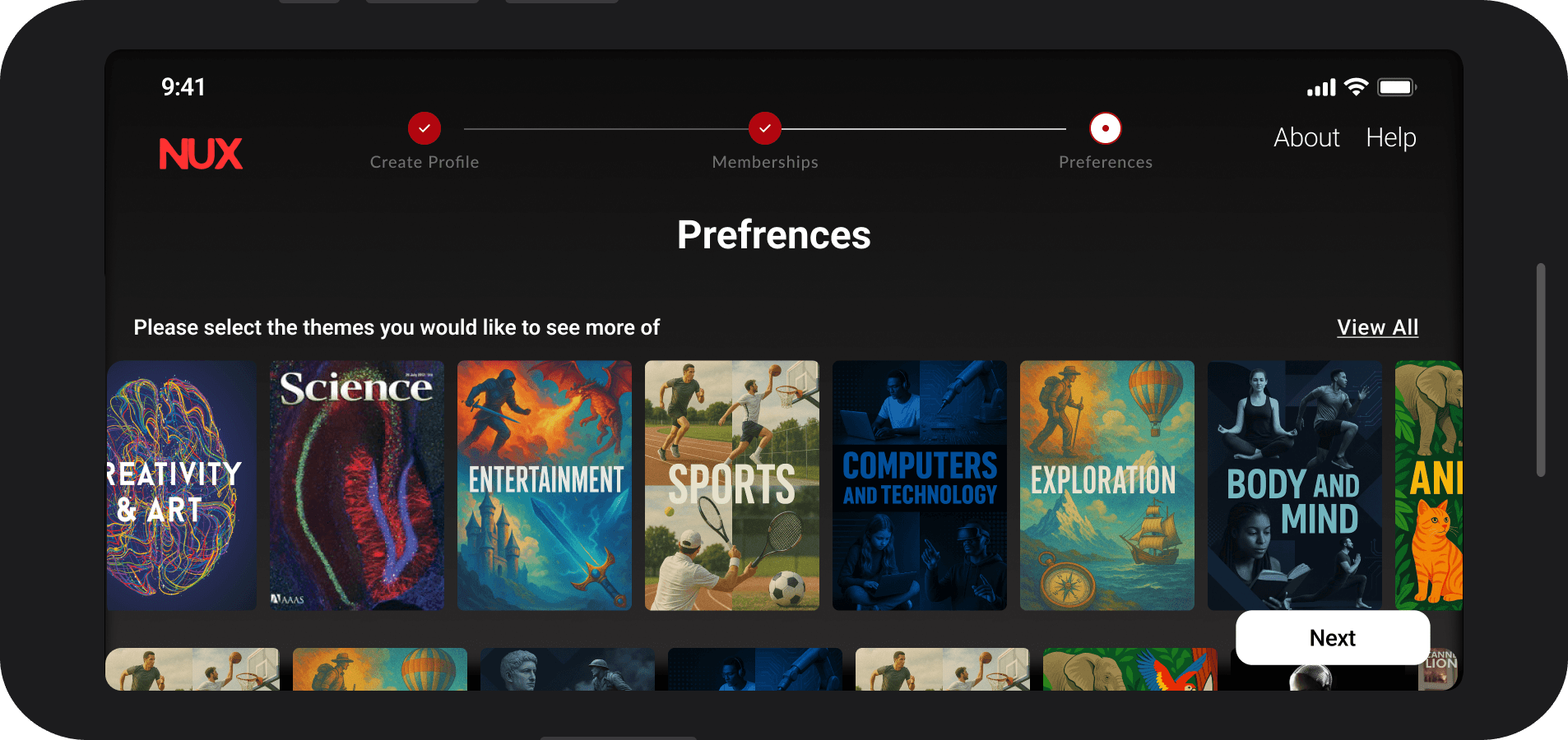
On Preferences & Interests, overlapping category labels slowed decision-making. I reduced the number of categories and sharpened each label to a single, clear meaning.
On Preferences & Interests, overlapping category labels slowed decision-making. I reduced the number of categories and sharpened each label to a single, clear meaning.
On Preferences & Interests, overlapping category labels slowed decision-making. I reduced the number of categories and sharpened each label to a single, clear meaning.

05 Final Solution
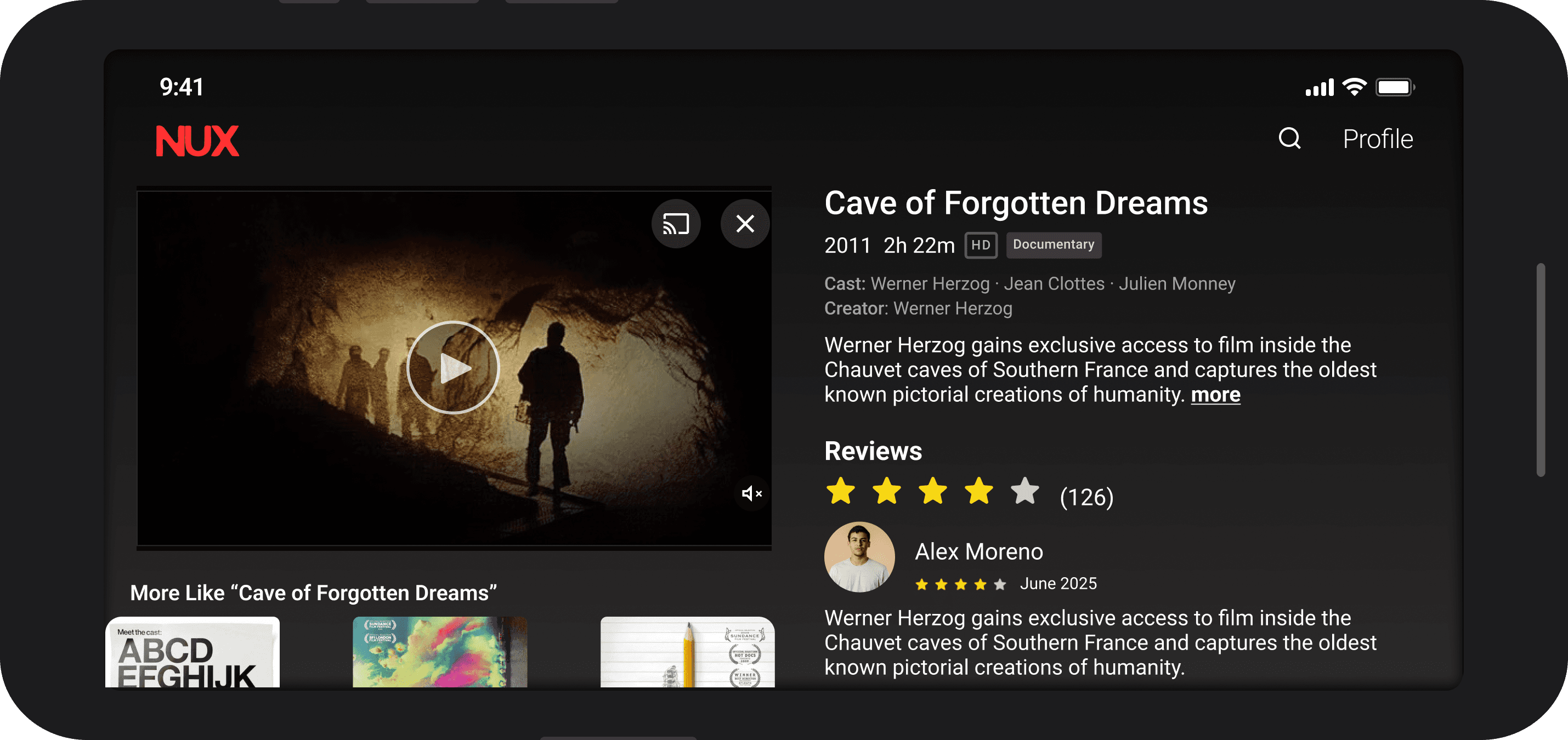
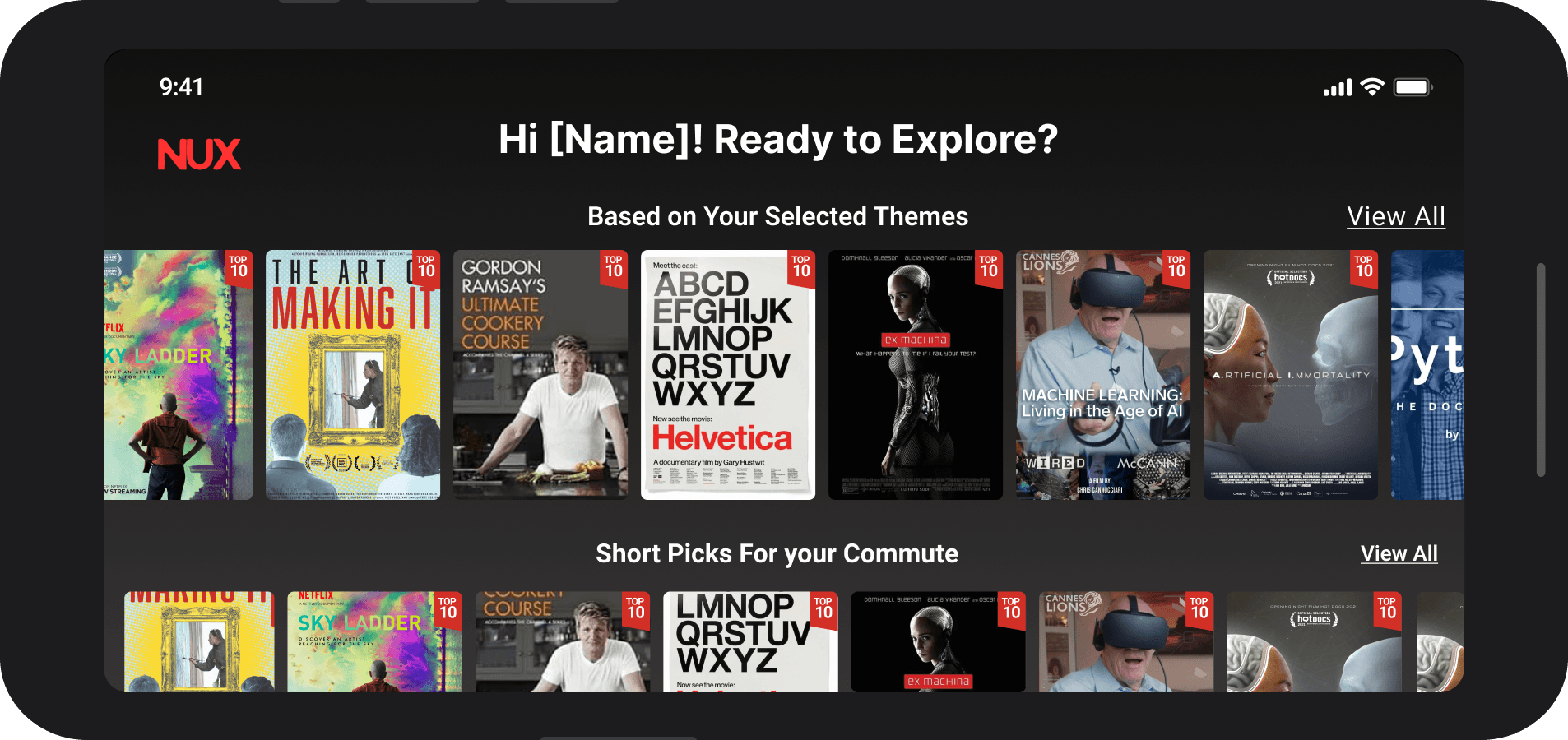
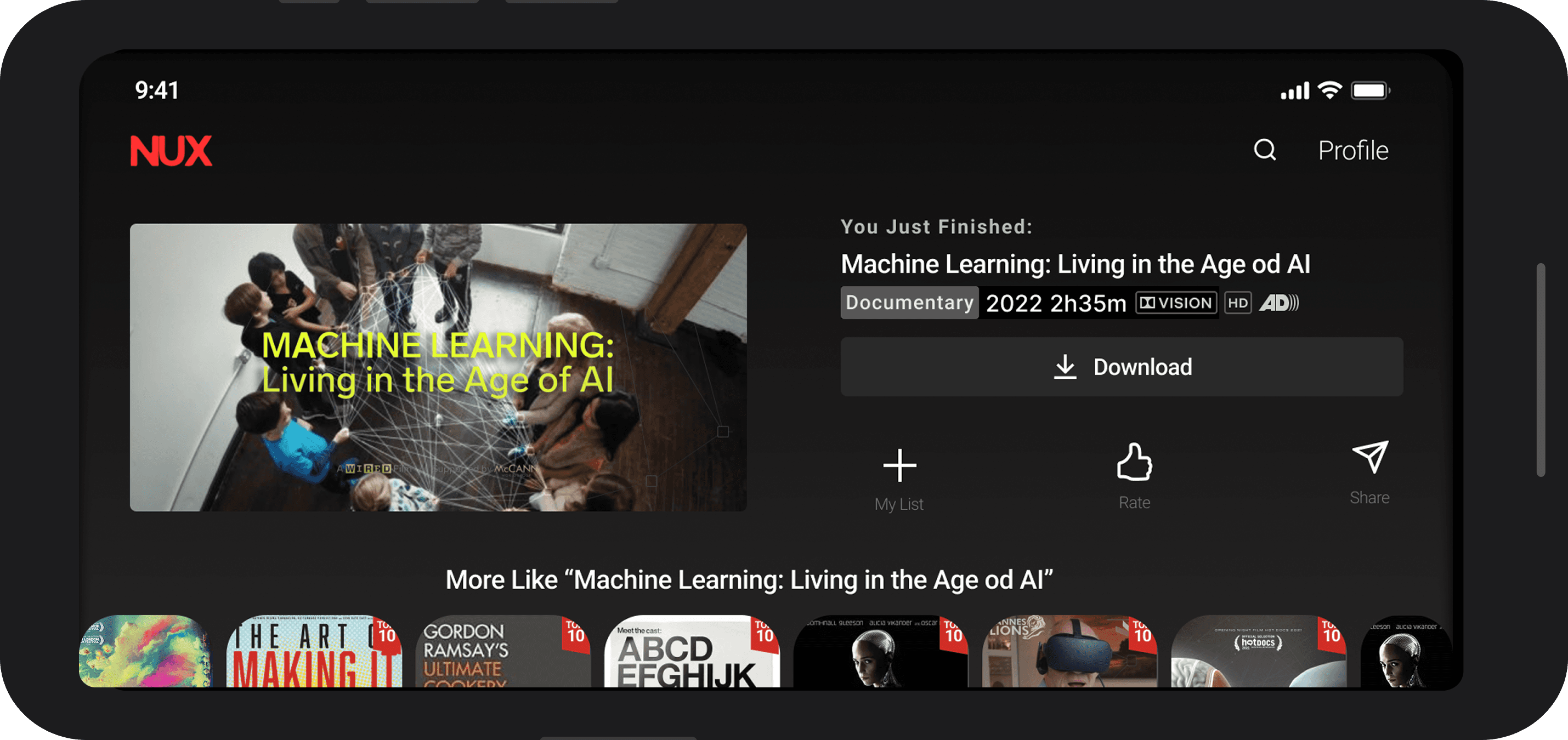
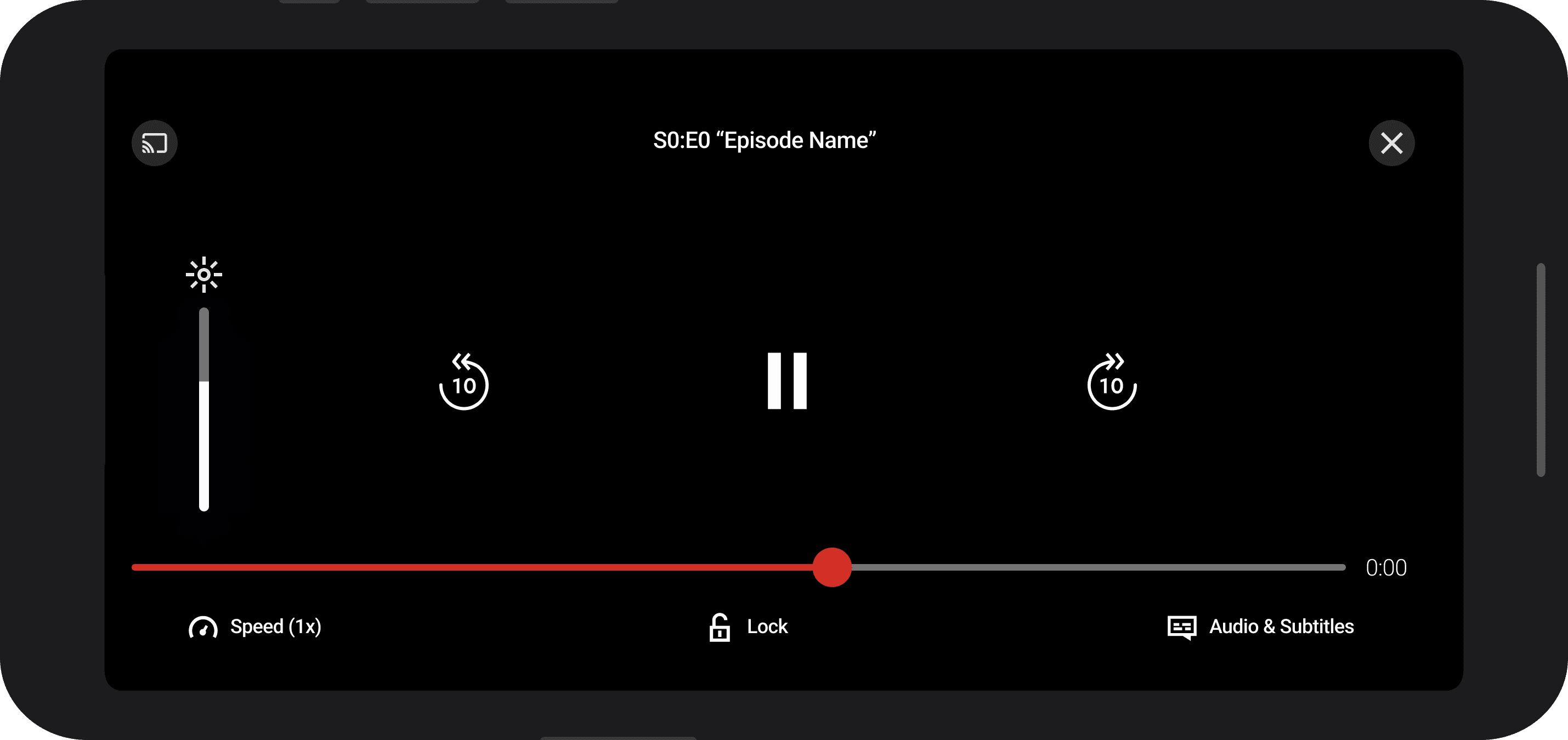
The finished prototype is a dark interface built for real-world conditions: commuting, dim lighting, quick decisions. A red accent drives every primary action, Roboto carries the typography across all weights, the layout follows an 8×8 modular grid with 24px margins, and interactive elements follow Material UI sizing so touch targets consistently feel right.
05 Final Solution
The finished prototype is a dark interface built for real-world conditions: commuting, dim lighting, quick decisions. A red accent drives every primary action, Roboto carries the typography across all weights, the layout follows an 8×8 modular grid with 24px margins, and interactive elements follow Material UI sizing so touch targets consistently feel right.
05 Final Solution
The finished prototype is a dark interface built for real-world conditions: commuting, dim lighting, quick decisions. A red accent drives every primary action, Roboto carries the typography across all weights, the layout follows an 8×8 modular grid with 24px margins, and interactive elements follow Material UI sizing so touch targets consistently feel right.
What I Learned
Information architecture problems often present as navigation problems until you look closer. The confusion between Topics and Library wasn't a labeling issue, it was that the two sections lacked distinct purposes; separating discovery from personal progress is what made the navigation work.
Personas also only hold value if they stay active through every decision, not just at the start. Returning to "would this help Rekha in 45 minutes?" at each step kept the design grounded in a real constraint rather than a theoretical one.
What I Learned
Information architecture problems often present as navigation problems until you look closer. The confusion between Topics and Library wasn't a labeling issue, it was that the two sections lacked distinct purposes; separating discovery from personal progress is what made the navigation work.
Personas also only hold value if they stay active through every decision, not just at the start. Returning to "would this help Rekha in 45 minutes?" at each step kept the design grounded in a real constraint rather than a theoretical one.
What I Learned
Information architecture problems often present as navigation problems until you look closer. The confusion between Topics and Library wasn't a labeling issue, it was that the two sections lacked distinct purposes; separating discovery from personal progress is what made the navigation work.
Personas also only hold value if they stay active through every decision, not just at the start. Returning to "would this help Rekha in 45 minutes?" at each step kept the design grounded in a real constraint rather than a theoretical one.